Most websites were built for traditional search engines, not AI-powered search. As a result, many rely on outdated structures, such as keyword-heavy pages, static PDFs, or poorly organised content, that make it difficult for AI systems to understand and retrieve information accurately. In this module, you'll learn how AI interprets your website, identify common barriers to AI search performance, and discover practical improvements that can make your content more accessible. You'll also use ChatBar AI to assess your own website, or a competitor's, and receive actionable recommendations to make it AI Search-ready.
AI tutor
Ask anything about this lesson.
AI tutor
Materials
Overview
What Makes a Site “AI Search-Ready”?
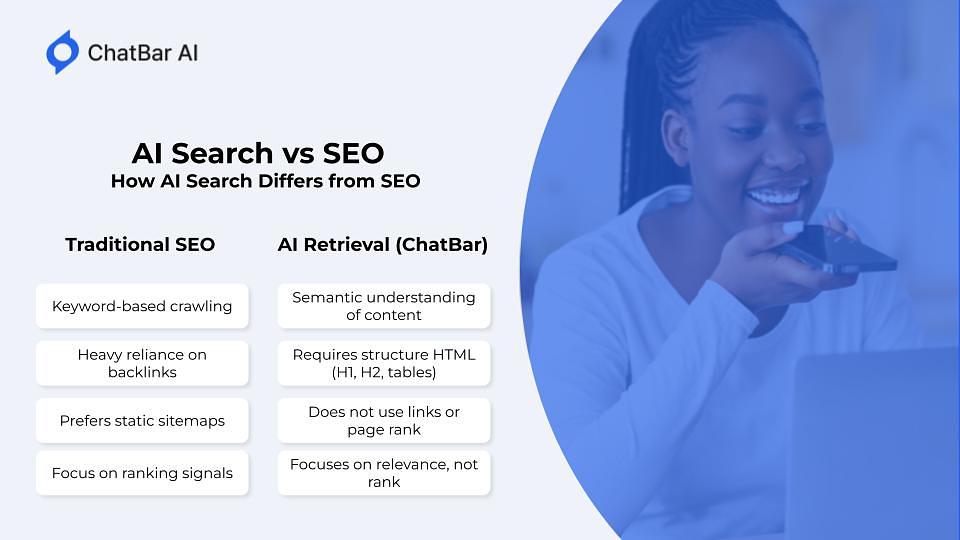
AI Search is not the same as traditional SEO. Here’s how it’s different:
The Three Layers of AI-Ready Content Here’s a simple model you can use to evaluate and fix your site. Ask your web developer to double check the following:
Structure: Clear HTML tags (H1, H2, bullet lists, sections)
The more information about your business and your business website you give to ChatBar in this case, the more help it can provide with helpful, specific suggestions.
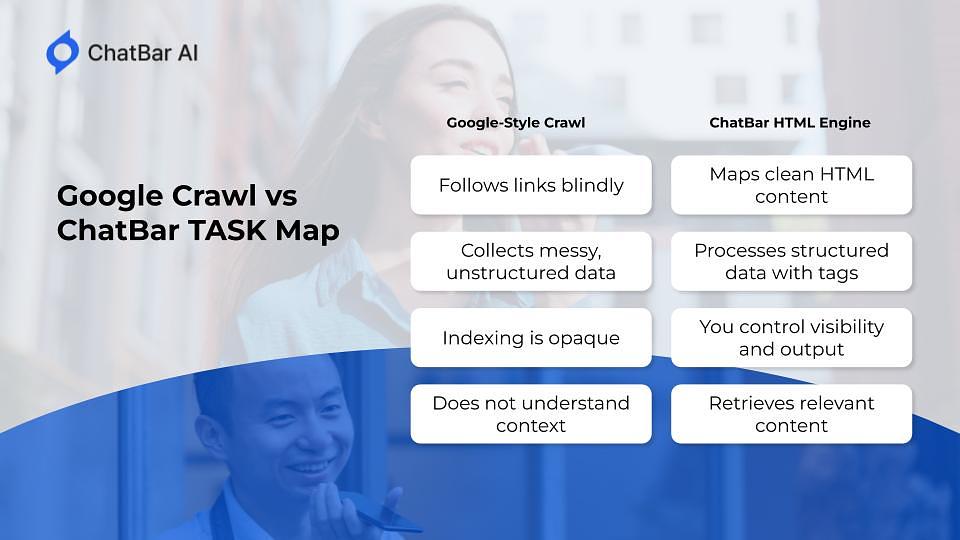
How ChatBar AI Simplifies the Work Even if your site isn’t perfect yet, RAG AI helps by:
Parsing most HTML automatically
Letting you control what’s shown and what’s hidden
Prioritizing clarity over beauty—AI doesn’t care how it looks, just how it’s structured
Read all of your website’s PDFs easily and with visual context
You don’t need to be a developer. You just need clean inputs.
Summary
AI Search requires structured, semantic, and clean content
Most websites block retrieval unintentionally
Fixes are often simple: better formatting, chunking, and HTML clarity
ChatBar gives you tools to test and improve your content strategy
With a few changes, your site can go from “invisible” to “intelligent”
AI Search Starts With You
Quiz
5 questions
Install this app for faster access
Use Safari to install: open this site in Safari, tap Share (square with up arrow), then tap Add to Home Screen.